If you happened to trade stocks, cash out cryptocurrency, or sell real estate or other capital assets during the tax year, you may need to file some new tax forms this year. Specifically, there’s a good chance you’ll need the Schedule D tax form — a capital gains tax form that helps you report profits and losses to the Internal Revenue Service.
But don’t let Schedule D scare you. When you file with TaxAct®, we guide you through reporting capital gains and will help you fill out the right forms automatically.
Let’s dive into what IRS Form Schedule D is and how to use it when filing your tax return.
What is Schedule D on a tax return?
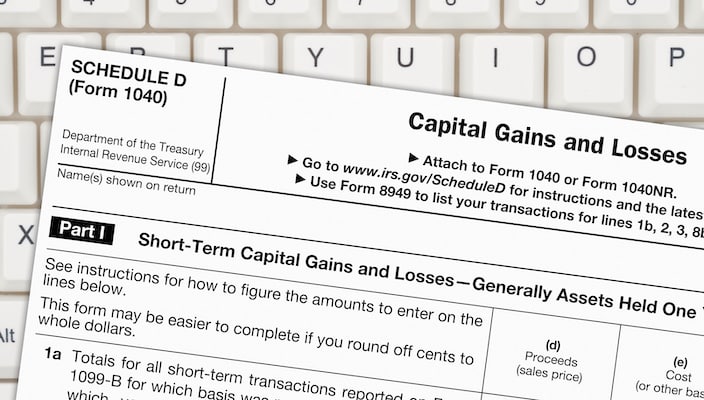
Schedule D (Form 1040) — also sometimes written as Schedule D 1040 — is an IRS form used to report capital gains and losses from the sale or exchange of capital assets.
You’ll typically use Schedule D if you sold things like:
Stocks, bonds, mutual funds, or other investments
Cryptocurrency
Real estate (including investment property)
Business property
Certain collectibles
This tax form works alongside your U.S. individual income tax return (Form 1040) to calculate how gains or losses from such sales affect your overall income tax and tax rate.
In this guide, we primarily focus on individual filers, but small business owners, partnerships, and S corporations may also encounter Schedule D form reporting through related filings, such as Schedule K-1.
Who needs to file Schedule D tax form?
Most taxpayers need to file a Schedule D tax form if they sold or exchanged a capital asset during the tax year. Most personal and investment property qualifies as capital assets, like the stocks, crypto, real estate, etc., we listed above.
When is Schedule D required?
You’ll generally need IRS Form Schedule D if you:
Sold investments reported on Form 1099-B
Reported transactions on Form 8949
Received capital gain distributions from mutual funds
Sold real estate or other investment property
Have a capital loss carryover from a prior year
Sold cryptocurrency or other digital assets reported on Form 1099-DA
Disposed of business property (often reported with Form 4797)
Had casualty or theft gains (Form 4684)
Basically, if you had any of these “dispositions of capital assets,” the IRS requires you to use Form Schedule D to report them. Don’t stress, though — TaxAct can help you determine if you need to file Form Schedule D based on information you provide about your tax situation.
When is Schedule D not required?
You may not need Schedule D if:
You only have qualified dividends reported directly on your tax return.
Your only capital gains are already included on your Form 1099-DIV and meet IRS exceptions.
You didn’t sell or exchange any capital assets during the year.
Exceptions like qualified dividends may sound confusing, but when in doubt, TaxAct can help guide your tax filing to ensure everything gets reported correctly.
Schedule D example
Before you start filling things out, it helps to see what Schedule D looks like. Here’s page 1 (out of 2):
At a high level, Schedule D pulls together:
Transaction details from Form 8949 (or other tax forms, if applicable)
Your sales price and cost basis (purchase price, plus any adjustments) to determine your gain or loss
Totals for short-term capital gains and long-term capital gains, which are taxed differently
Any capital loss carryover amounts from previous tax years
IRS Form Schedule D essentially acts as a summary sheet for other tax forms. For example, you might report detailed transactions on Form 8949, and the totals from there flow to Schedule D to summarize everything for the IRS on your federal tax return.
Schedule D instructions: How to fill out Schedule D
Now, let’s break down the Schedule D instructions step by step. The form is divided into three main sections: Part I, Part II, and Part III.
Part I: Short-term capital gains and losses
Part I covers short-term capital gains and short-term capital loss amounts. These are assets you held for one year or less. Short-term gains are taxed at your ordinary tax rate, meaning they’re treated just like ordinary income.
Here’s what you’ll do:
Report totals from the short-term section of Form 8949
Include proceeds from Form 1099-B or Form 1099-DA, if applicable
Enter your cost basis and sales price
Calculate your net short-term capital gains or losses
You may also need to include:
TaxAct can help you fill out this section by asking you questions about your short-term gains and pulling info from your other tax forms as needed.
Part II: Long-term capital gains and losses
Part II focuses on long-term capital gains, or gains from assets held for more than one year. Long-term gains are typically taxed at lower tax brackets than ordinary income, which can help reduce your overall income tax bill.
In this section, you’ll do a lot of the same things as Part I (just for long-term transactions), such as:
Report totals from the long-term section of Form 8949
Include capital gain distributions (often reported on Form 1099-DIV)
Enter your cost basis and sales price for long-term transactions
Calculate your net long-term gain or loss
You may also need to include:
Again, TaxAct will walk you through all of the above, so don’t stress!
Part III: Summary
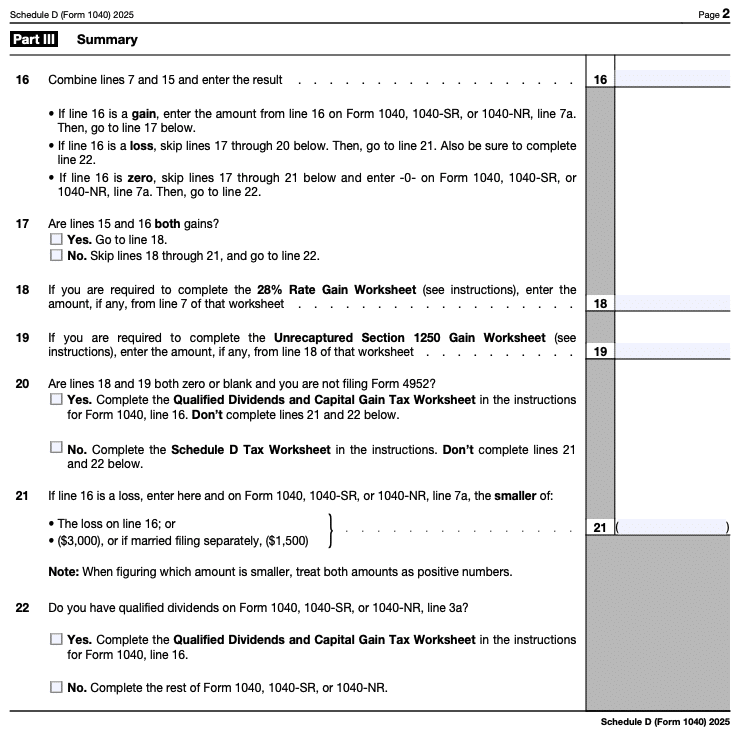
Part III ties everything together. In this section, you will:
Combine totals from Part I and Part II
Apply any capital gain tax worksheet amounts
Determine your final capital gain or loss
Use the Schedule D tax worksheets to calculate your additional tax (if applicable)
The final number from Part III flows directly into your Form 1040 or Form 1040-NR and can affect your overall tax refund or balance due.
What forms require a Schedule D?
Remember, Schedule D serves as a summary form, using information from other tax forms to neatly summarize different types of capital gains and losses for the IRS.
Here’s how Schedule D connects to some other common tax forms:
TaxAct helps you with your tax preparation by connecting all these capital gains tax forms behind the scenes for you.
Schedule D FAQs
How to file Schedule D with TaxAct
If you sold stocks, bonds, options, or other investments, you’ll need both Form 8949 and Schedule D when filing your federal tax return.
Here’s how TaxAct helps you fill out Schedule D:
First, we’ll ask you to enter your Form 1099-B details directly into the program.You can do this manually, import from a TaxAct-supported brokerage or CSV, or use our Stock Assistant tool.
If you didn’t receive Form 1099-B, that’s okay. You can still report the transaction(s) and note that you didn’t receive the form.
We then automatically transfer that information to Form 8949, Schedule D, and Form 1040 as needed.
Once you enter your transactions, we’ll continue with the filing process. Our tax preparation software walks you through each step so you can file confidently.
The bottom line
If you sold investments or other capital assets during the tax year, you likely need to file Schedule D with your tax return. While the Schedule D tax form might look intimidating at first glance, it’s simply a summary of your short-term capital gains, long-term capital gains, and any losses.
Let TaxAct guide you through reporting your capital gains this year — we’ll connect all the necessary tax forms behind the scenes so you can DIY your capital gains tax reporting with minimal stress.
This article is for informational purposes only and not legal or financial advice.
All TaxAct offers, products and services are subject to applicable terms and conditions.