No Result
View All Result
SUBMIT YOUR ARTICLES
  • Login
Sunday, June 21, 2026
TheAdviserMagazine.com
  • Home
  • Financial Planning
    • Financial Planning
    • Personal Finance
  • Market Research
    • Business
    • Investing
    • Money
    • Economy
    • Markets
    • Stocks
    • Trading
  • 401k Plans
  • College
  • IRS & Taxes
  • Estate Plans
  • Social Security
  • Medicare
  • Legal
  • Home
  • Financial Planning
    • Financial Planning
    • Personal Finance
  • Market Research
    • Business
    • Investing
    • Money
    • Economy
    • Markets
    • Stocks
    • Trading
  • 401k Plans
  • College
  • IRS & Taxes
  • Estate Plans
  • Social Security
  • Medicare
  • Legal
No Result
View All Result
TheAdviserMagazine.com
No Result
View All Result
Home IRS & Taxes

IRS Form 2848: A Guide to Power of Attorney for Tax Matters

by TheAdviserMagazine
2 months ago
in IRS & Taxes
Reading Time: 8 mins read
A A
IRS Form 2848: A Guide to Power of Attorney for Tax Matters
Share on FacebookShare on TwitterShare on LInkedIn


When dealing with tax matters, you might need someone else to handle things for you. Whether you’re facing an audit, resolving a tax liability, or just want your CPA to speak with the Internal Revenue Service (IRS) on your behalf, IRS Form 2848 is what you need. Let’s break down this form and how to fill it out so you can complete Form 2848 without any added stress.

At a glance:

Form 2848 grants a power of attorney for tax matters with the IRS.

This means a CPA, tax attorney, or enrolled agent can represent you for tax matters of your choosing.

TaxAct® can help you fill out this tax document and submit Form 2848 to the IRS.

What is IRS Form 2848?

IRS Form 2848, also called the Power of Attorney and Declaration of Representative, is a legal document that allows a taxpayer to authorize another individual to represent them before the IRS. This person — called the designated representative — can discuss your tax issues, access confidential tax information, and act on behalf of the taxpayer (you) regarding specific tax matters.

Once filled out, you can submit it to the IRS via mail or fax, or you can securely upload Form 2848 using your IRS account (if you already mailed or faxed the form, don’t submit it online). TaxAct can help you complete and print the form when you file with us.

Once the IRS processes the form, it will assign a CAF number (Centralized Authorization File number) for tracking purposes.

Why is Form 2848 important?

Form 2848 simplifies dealing with complex tax matters by allowing you to designate a trusted representative as your legal authority. Whether you’re navigating an audit, handling business tax issues, or needing expert assistance, this form ensures you have the right support when interacting with the IRS. 

This power of attorney authorizes the representative to perform duties such as signing consents, extending the time to assess tax, recording interviews, or executing waivers agreeing to a tax adjustment.

Who should use Form 2848?

You should use Form 2848 if you need to grant someone authority to represent you before the IRS. Some scenarios may include:

A taxpayer giving an enrolled agent (EA) the ability to respond to IRS notices and represent them in an audit.

A business owner authorizing their CPA to handle business tax matters.

A senior citizen allowing a legally qualified family member to manage their tax-related matters.

A corporate officer granting authority to an attorney to negotiate a tax debt.

A taxpayer working with a low-income taxpayer clinic to resolve tax disputes.

Form 2848 example

IRS Form 2848 consists of two pages and looks like this:
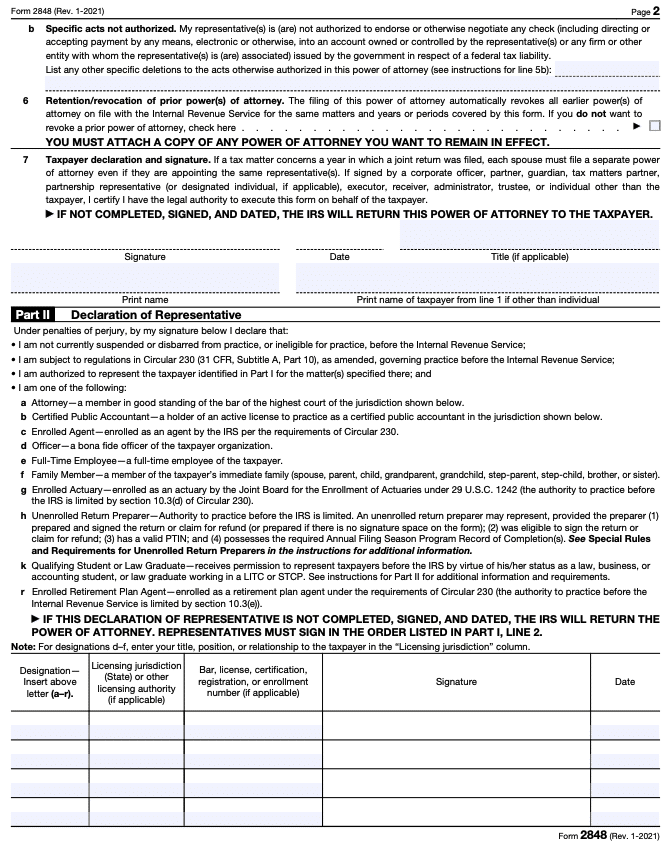
IRS Form 2848 page 2

When filling out this tax form, you’ll need to provide:

Taxpayer information: Your name, taxpayer identification number, phone number, and mailing address.

Representative information: Your representative’s name, preparer tax identification number (PTIN), address, and phone number.

Specific tax matters you are authorizing: For example, certain tax years and types of tax.

Signatures: From both the taxpayer (you) and the designated representative.

Common terms explained in plain talk

Power of attorney (POA): A legal document allowing someone to act on your behalf. In the context of Form 2848, it only applies to specific tax matters.

CAF number: A unique identifier assigned to representatives by the IRS. This number is used to track their interactions with the IRS. 

Tax matters: The specific tax issues the representative is authorized to handle (e.g., income tax, employment tax).

Enrolled agent (EA): A licensed tax professional authorized to represent taxpayers before the IRS.

Form 2848 instructions: How to fill out Form 2848

Here’s how to complete Form 2848 step-by-step:

Fill out your information: Provide your taxpayer name, Social Security number (SSN) or employer identification number (EIN), and mailing address.

List authorized representative info: Enter the representative’s information, including name, address, phone number, PTIN, and CAF number (if they have one). If the representative does not have a CAF number yet, write “None,” and the IRS will issue them one.

Note:  If the IRS has not assigned a PTIN, but the representative has applied for one, write “applied for” on the line. Unenrolled return preparers must possess a valid PTIN to represent a taxpayer before the IRS.

Specify acts authorized: Detail the type of tax matters the representative is authorized to handle. For example, the tax form number (e.g., Form 1040, Form 941), tax periods, and specific use for which you grant authority. You can also specify acts not authorized if needed. The representative may list any amount of previous tax years, but can only list up to three future tax years.

Indicate retention/revocation: Indicate whether this form will revoke previous powers of attorney or if you want prior authorizations to remain active. If the box on line 4 is checked, it will not revoke any prior powers of attorney recorded on the CAF. If it isn’t checked, just make sure you are intentionally revoking prior powers of attorney.

Sign form: The taxpayer must sign and date the form. The designated representative must also sign Part II, the Declaration of Representative.

Form 2848 FAQs


Can I authorize more than one representative?

Yes, you can appoint multiple representatives, but they will each need their own CAF number. If you want to name more than four representatives, write “See attached for additional representatives” in the space to the right of Form 2848, line 2, and attach an additional Form 2848.

Only individuals may be named as representatives. Your representative must be an eligible individual, such as a certified public accountant (CPA), enrolled agent (EA), tax attorney, or other qualified tax professional. Depending on the specific tax situation, a family member, corporate officer, or even an unenrolled return preparer may be authorized.


How long does the authorization last?

The authorization typically remains in effect until you revoke it, the tax period specified expires, your representative withdraws it, or another representative files a POA for the same taxpayer and time period.


How do I revoke the authorization?

If you need to revoke the authorization, you can submit a new Form 2848 stating that you are revoking all prior authorizations:

• If you have a copy of the executed POA, you need to write “REVOKE” across the top of the first page with a current signature and date.• If you do not have a copy of the executed POA, you need to send the IRS a statement that• states the POA is revoked for a representative, providing their name and address;• lists the tax year(s) and matters that are being revoked; and• is signed and dated.• If you are fully revoking all authority, you can send in a statement that says “revoke all years/periods” instead of listing the specific matters/years.


Does Form 2848 authorize my representative to manage my finances?

No, this tax form only grants authority over tax-related matters you specified. It does not give access to your bank accounts or assets.


What’s the difference between Form 2848 and Form 8821?

While both tax forms grant authority to another person, Form 2848 allows your designated representative to act on your behalf in tax matters, including speaking with the IRS and making decisions. Form 8821, on the other hand, only allows someone to access your confidential tax information (but not act on your behalf).

Form 8821 can also allow a corporation, firm, organization, or partnership to inspect or receive your confidential information, whereas a POA only grants power to individuals.


What is the Form 2848 mailing address?

The mailing address for Form 2848 depends on where you live and the type of tax matter involved. You can find the correct address on the IRS website under the Where To File Chart in Instructions for Form 2848. Alternatively, you can fax the form to the fax number listed in the form’s instructions.

How to file Form 2848 with TaxAct

If you do your tax filing with TaxAct, you can choose to indicate that you want to attach and mail Form 2848 with Form 8453, U.S. Individual Income Tax Transmittal for an IRS e-file Return (when e-filing the income tax return). Below, we cover how to do this depending on what version of TaxAct you are using.

Online (Dashboard view)

From within your TaxAct return, click Resources. On smaller devices, click the menu in the top-left corner of your screen, then make your selection.

Under My Return, click Federal Search. 

Click the Miscellaneous Topics drop-down, click the Additional Information for E-Filing drop-down, then click Attachments for E-Filed Returns.

Complete the rest of the interview process. 

Online (Classic view)

From within your TaxAct return, click Federal. On smaller devices, click the menu at the top left corner of your screen, then make your selection.

Click the Miscellaneous Topics drop-down, click the Additional Information for E-Filing drop-down, then click Attachments for E-Filed Returns (as shown in the screenshot below).

On the screen titled E-Filing – Attachments, click the Checkbox next to Form 2848 – Power of Attorney and Declaration of Representative (or POA that states the agent is granted authority to sign the return) as shown below, then click Continue.

Complete the rest of the interview process. 

A screenshot showing how to find Form 2848 as an attachment for e-filed returns

Desktop

From within your TaxAct return, click Federal. 

Click the Miscellaneous Topics drop-down, click the Additional Information for E-Filing drop-down, then click Attachments for E-Filed Returns.

Complete the rest of the interview process. 

For more information about filling out Form 2848 with TaxAct, check out our Form 2848 support page.

The bottom line

If you need someone to handle your tax-related matters, IRS Form 2848 is the way to go. Whether you’re a business owner, an individual taxpayer dealing with an audit, or just want a tax professional to help with tax preparation, granting power of attorney can make your life easier. Make sure to complete Form 2848 accurately and submit the form properly by mail or fax to avoid delays. And don’t forget — TaxAct can help you complete and print this form when you e-file with us.

This article is for informational purposes only and not legal or financial advice.

All TaxAct offers, products and services are subject to applicable terms and conditions.



Source link

Tags: AttorneyFormGuideIRSMattersPowertax
ShareTweetShare
Previous Post

401(k) credit may need nudge from advisors and CPAs

Next Post

Rafael close to buying VW plant

Related Posts

edit post
Lose the Hobby Loss Fight, But Save the Farm – Houston Tax Attorneys

Lose the Hobby Loss Fight, But Save the Farm – Houston Tax Attorneys

by TheAdviserMagazine
June 20, 2026
0

Most people who run a side venture know the IRS can be a difficult business partner. It happily takes a...

edit post
Payroll control gaps: Lessons from last-minute saves

Payroll control gaps: Lessons from last-minute saves

by TheAdviserMagazine
June 18, 2026
0

When quick fixes become the norm, hidden compliance and operational risks grow Highlights Frequent last‑minute payroll fixes often signal weak...

edit post
What exactly is direct tax?

What exactly is direct tax?

by TheAdviserMagazine
June 18, 2026
0

Highlights Direct tax is paid directly by the taxpayer to the government and commonly includes individual income tax, corporate income...

edit post
5 Assets You MUST Put In Your Trust Right Now |

5 Assets You MUST Put In Your Trust Right Now |

by TheAdviserMagazine
June 18, 2026
0

You spent the time and money to create a living trust. But if you never transfer assets into it, that...

edit post
Are Digital Services Taxes a Viable Solution for the EU Budget?

Are Digital Services Taxes a Viable Solution for the EU Budget?

by TheAdviserMagazine
June 18, 2026
0

Introduction Over the last few years, concerns have been raised that the existing international taxA tax is a mandatory payment...

edit post
How to use AI in audit workflows: A practical guide

How to use AI in audit workflows: A practical guide

by TheAdviserMagazine
June 17, 2026
0

Straightforward answers for applying AI across the audit lifecycle Highlights AI enhances audit efficiency by automating routine confirmation tasks and...

Next Post
edit post
Rafael close to buying VW plant

Rafael close to buying VW plant

edit post
Is Unemployment Compensation Taxable Income?

Is Unemployment Compensation Taxable Income?

  • Trending
  • Comments
  • Latest
edit post
New York Seniors: 6 STAR Tax Relief Rules That Could Put a Bigger Check in Your Mailbox

New York Seniors: 6 STAR Tax Relief Rules That Could Put a Bigger Check in Your Mailbox

June 20, 2026
edit post
5 Pennsylvania Rebate Rules Seniors Should Check Before the Property Tax/Rent Deadline

5 Pennsylvania Rebate Rules Seniors Should Check Before the Property Tax/Rent Deadline

June 18, 2026
edit post
Florida Roads Become a Battleground for Illegal Immigration

Florida Roads Become a Battleground for Illegal Immigration

June 9, 2026
edit post
Louisiana’s Age-Tiered Homestead Exemption: 8 Details About the Proposed 2028 Amendment

Louisiana’s Age-Tiered Homestead Exemption: 8 Details About the Proposed 2028 Amendment

June 15, 2026
edit post
The 8 States That Still Tax Social Security in 2026

The 8 States That Still Tax Social Security in 2026

June 6, 2026
edit post
It’s Time To Talk About Massie

It’s Time To Talk About Massie

May 23, 2026
edit post
Zelensky’s Ultimatum To Lukashenko Gives Putin The Chance To Finally Restore Deterrence

Zelensky’s Ultimatum To Lukashenko Gives Putin The Chance To Finally Restore Deterrence

0
edit post
Dow futures drop and oil jumps as first day of US-Iran talks sees Trump threaten Tehran on Hormuz

Dow futures drop and oil jumps as first day of US-Iran talks sees Trump threaten Tehran on Hormuz

0
edit post
Bitcoin Clings to ,000 as Iran Closures Hormuz and US Threatens Retaliation

Bitcoin Clings to $64,000 as Iran Closures Hormuz and US Threatens Retaliation

0
edit post
SpaceX IPO shines a light on the product set to disrupt Wall Street

SpaceX IPO shines a light on the product set to disrupt Wall Street

0
edit post
Hindsight Hillary Making Headlines Again

Hindsight Hillary Making Headlines Again

0
edit post
Understanding the Growth of Private Markets

Understanding the Growth of Private Markets

0
edit post
Understanding the Growth of Private Markets

Understanding the Growth of Private Markets

June 21, 2026
edit post
Dow futures drop and oil jumps as first day of US-Iran talks sees Trump threaten Tehran on Hormuz

Dow futures drop and oil jumps as first day of US-Iran talks sees Trump threaten Tehran on Hormuz

June 21, 2026
edit post
Dave Ramsey Tells Couple Supporting 84-Year-Old Father-in-Law With ,000 of Debt: ‘It Won’t End Until You End It’

Dave Ramsey Tells Couple Supporting 84-Year-Old Father-in-Law With $33,000 of Debt: ‘It Won’t End Until You End It’

June 21, 2026
edit post
I asked AI to show me a picture of my future kids, and learned a harsh lesson in how technology shows us what we want to see, not what’s real

I asked AI to show me a picture of my future kids, and learned a harsh lesson in how technology shows us what we want to see, not what’s real

June 21, 2026
edit post
US-Iran talks just started and Trump is already threatening to attack, causing negotiations to pause

US-Iran talks just started and Trump is already threatening to attack, causing negotiations to pause

June 21, 2026
edit post
Prime Day Starts Soon: 7 Ways to Tell a Real Deal From a Fake

Prime Day Starts Soon: 7 Ways to Tell a Real Deal From a Fake

June 21, 2026
The Adviser Magazine

The first and only national digital and print magazine that connects individuals, families, and businesses to Fee-Only financial advisers, accountants, attorneys and college guidance counselors.

CATEGORIES

  • 401k Plans
  • Business
  • College
  • Cryptocurrency
  • Economy
  • Estate Plans
  • Financial Planning
  • Investing
  • IRS & Taxes
  • Legal
  • Market Analysis
  • Markets
  • Medicare
  • Money
  • Personal Finance
  • Social Security
  • Startups
  • Stock Market
  • Trading

LATEST UPDATES

  • Understanding the Growth of Private Markets
  • Dow futures drop and oil jumps as first day of US-Iran talks sees Trump threaten Tehran on Hormuz
  • Dave Ramsey Tells Couple Supporting 84-Year-Old Father-in-Law With $33,000 of Debt: ‘It Won’t End Until You End It’
  • Our Great Privacy Policy
  • Terms of Use, Legal Notices & Disclosures
  • Contact us
  • About Us

© Copyright 2024 All Rights Reserved
See articles for original source and related links to external sites.

Welcome Back!

Login to your account below

Forgotten Password?

Retrieve your password

Please enter your username or email address to reset your password.

Log In
No Result
View All Result
  • Home
  • Financial Planning
    • Financial Planning
    • Personal Finance
  • Market Research
    • Business
    • Investing
    • Money
    • Economy
    • Markets
    • Stocks
    • Trading
  • 401k Plans
  • College
  • IRS & Taxes
  • Estate Plans
  • Social Security
  • Medicare
  • Legal

© Copyright 2024 All Rights Reserved
See articles for original source and related links to external sites.