Unemployment benefits can be a vital support for those experiencing unexpected job loss. If you received unemployment compensation for the first time this year, you may be wondering how it will impact your taxes. Since unemployment income is taxable at the federal level, it’s important to understand the process and the information you’ll need when filing your taxes. Let’s review the basics.
At a glance:
Unemployment payments are taxable at the federal level.
State taxation of unemployment benefits varies by state.
Form 1099-G details all the unemployment compensation taxpayers received during the year and any federal or state taxes withheld.
Special considerations
Tax credits
If you received unemployment income this year, it could mean your income was less than in prior years. A lower income might make you eligible for tax credits you otherwise would not have been able to claim, such as the Earned Income Tax Credit.
Unemployment withholding
Also, keep in mind that if you didn’t have enough tax withheld from your unemployment benefits, you should expect to owe more at tax time. The opposite is also true — if you overpay taxes on your unemployment income, you’ll receive any excess money back as a tax refund.
How do I report my unemployment income in TaxAct?
If you use TaxAct® to file your federal tax return, reporting unemployment income is straightforward. We’ll walk you through the necessary steps and help you report your unemployment income correctly using our tax software. Below, we cover how to do this depending on what version of TaxAct you are using.
Online (Dashboard view)
From within your TaxAct return, click Income.
On smaller devices, click the menu at the top left corner of your screen, then make your selection.
Click the Explore More drop-down.
Click Add beside Unemployment & Paid Family Leave.
Complete the rest of the interview process.
Online (Classic view)
From within your TaxAct return, click Federal.
On smaller devices, click the menu at the top left corner of your screen, then make your selection.
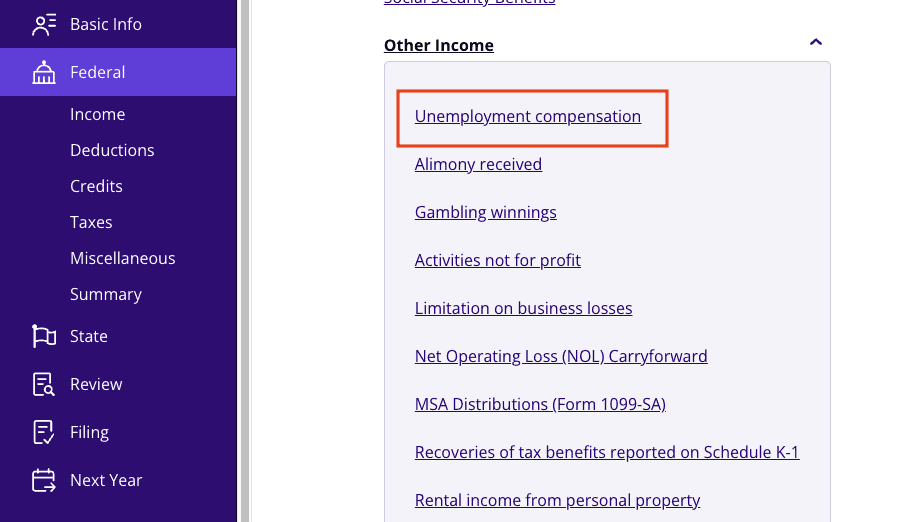
Click the Other Income drop-down, then click Unemployment Compensation as shown in the screenshot below.
Click Add Form 1099-G.
Complete the rest of the interview process.
Desktop
From within your TaxAct return, click Federal.
Click the Other Income drop-down, then click Unemployment Compensation.
Click Add beside New Copy of Federal Form 1099-G Unemployment Income.
Complete the rest of the interview process.
The bottom line
While unemployment benefits can provide crucial financial support during times of job loss, it’s important to understand their tax implications. Unemployment compensation is taxable at the federal level, and depending on your state, you may also owe state taxes.
By keeping track of your unemployment income through Form 1099-G and opting for voluntary tax withholding, you can make the tax process easier when filing your return. Remember to consult with your state’s tax agency for any specific guidelines, and be mindful of potential tax credits that may apply to your situation.
This article is for informational purposes only and not legal or financial advice.
All TaxAct offers, products and services are subject to applicable terms and conditions.