No Result
View All Result
SUBMIT YOUR ARTICLES
  • Login
Monday, April 20, 2026
TheAdviserMagazine.com
  • Home
  • Financial Planning
    • Financial Planning
    • Personal Finance
  • Market Research
    • Business
    • Investing
    • Money
    • Economy
    • Markets
    • Stocks
    • Trading
  • 401k Plans
  • College
  • IRS & Taxes
  • Estate Plans
  • Social Security
  • Medicare
  • Legal
  • Home
  • Financial Planning
    • Financial Planning
    • Personal Finance
  • Market Research
    • Business
    • Investing
    • Money
    • Economy
    • Markets
    • Stocks
    • Trading
  • 401k Plans
  • College
  • IRS & Taxes
  • Estate Plans
  • Social Security
  • Medicare
  • Legal
No Result
View All Result
TheAdviserMagazine.com
No Result
View All Result
Home IRS & Taxes

Guide to Tax Form 1099-G

by TheAdviserMagazine
3 weeks ago
in IRS & Taxes
Reading Time: 7 mins read
A A
Guide to Tax Form 1099-G
Share on FacebookShare on TwitterShare on LInkedIn


Did you receive Form 1099-G this tax year? Here’s everything you need to know about this important tax form and how to use it when filing your income tax return with the Internal Revenue Service (IRS).

At a glance:

Form 1099-G most commonly reports unemployment compensation plus any state or local tax refunds you received.

You can receive a 1099-G for other reasons as well.

TaxAct can help you determine how to report your 1099-G payment if necessary.

What is 1099-G used for?

IRS Form 1099-G, Certain Government Payments, is a tax form used to report income you received from government sources. The most common reason you’d receive this form is if you collected unemployment benefits, but there are other reasons, too. It can also report other payments from a government agency, such as a state or local tax refund or a payment from the Agricultural Payments Program. In many cases, you may need to report 1099-G payments on your tax return.

Example of Form 1099-G

Here’s a 1099-G example so you can see what the tax form looks like:

A 1099-G form covers various types of income you might have received from the government. Here’s what you might find on the form:

Unemployment compensation (Box 1): If you received unemployment benefits during the tax year, the total amount will be listed here. Unemployment compensation is taxable income, so the IRS definitely wants to know about it.

State or local income tax refunds, credits, or offsets (Box 2): If you got a tax refund, offset, or credit from your state or local government, it might be listed here. However, you typically only need to report this income if you previously claimed a federal deduction for paying those taxes (in the year indicated in Box 3) and if that deduction actually reduced your federal taxes.

Federal income tax withheld (Box 4): If any taxes were withheld from your unemployment benefits or other payments, you’ll see the amount here. This can be a bit of a silver lining — it means you’ve already prepaid some of your tax bill.

RTAA payments (Box 5): This shows any reemployment trade adjustment assistance (RTAA) payments you received. RTAA is a wage supplement for certain people who lost their jobs due to foreign trade.

Taxable grants (Box 6): Any taxable grants you received from government agencies are listed here.

Agricultural payments (Box 7): For those involved in farming, any payments received from the Department of Agriculture would appear in this box. Box 9 also shows market gains on certain loan types available exclusively to farmers.

Form 1099-G instructions

Here’s what you need to do once you have your 1099-G form in hand:

Review the form carefully: Double-check all the details on your Form 1099-G. Make sure your name, Social Security number, and the amounts listed are accurate. If you notice any discrepancies, like a payment amount that seems way off or income you never received, contact the issuing agency right away. It could be a mistake or, worse, a sign of identity theft.

Report the income on your tax return: The income reported on your 1099-G may need to be included on your federal tax return. Not to worry, TaxAct can help you with this (scroll to the last section for detailed instructions on how to do so).

Consider state-specific guidance: Each state may have its own 1099-G requirements, depending on the type of government payment you received. Make sure to follow any specific 1099-G state guidance from your state’s tax authority (TaxAct can help you with this if you file your state income tax return with us).

Keep the form for your records: After you’ve reported the income on your tax return, don’t just toss the 1099-G in the recycling bin. Keep it with your tax records for at least a few years. You won’t need to send the form to the IRS when you file, but you’ll want to have it on hand in case they come back with any questions.

FAQs about Form 1099-G


Why did I receive a 1099-G for money I never claimed?

If you received a 1099-G for money you never claimed, it’s possible that someone else filed for unemployment or other benefits in your name. The government saw an uptick in fraudulent claims during the pandemic, and it can still happen, so it’s essential to review your Form 1099-G carefully.

If you suspect identity theft, it’s important to act quickly. Contact the issuing agency immediately to report the error and follow up with the IRS to ensure your tax return reflects the correct tax information. The US Department of Labor has a website for victims of unemployment fraud, so start there. Then, contact the state agency that issued the 1099-G and request a revised form.

Don’t just toss a fraudulent form aside and hope it goes away — because it won’t. The IRS will still expect you to report the income listed on the form unless you take steps to correct it. You can read more about tax identity theft here.


Are 1099-K and 1099-G the same?

No, Form 1099-K and Form 1099-G are not the same, although it’s easy to mix them up. Both forms may report income you received from sources other than your normal salary. A 1099-K form reports income from payment card transactions or third-party network transactions. For example, a third party like PayPal® or Etsy® may send you a 1099-K if you received money through their platform. Meanwhile, a 1099-G form only reports payments made to you by the government.

How to File Form 1099-G with TaxAct

TaxAct can help you file your 1099-G. How you input this tax form in our software depends on what kind of government payment you’re dealing with. Since unemployment compensation and state and local tax refunds are the most common, we’ve compiled 1099-G requirements for those scenarios and how to report them in TaxAct below.

1099-G: Unemployment compensation

If you received unemployment income, it will be in Box 1 of Form 1099-G, which you must report during tax filing. To report this information using TaxAct®:

Dashboard

From within your TaxAct return, click Income.

On smaller devices, click the menu at the top left corner of your screen, then make your selection.

Click the Explore More drop-down.

Click Add beside Unemployment & Paid Family Leave. 

Complete the rest of the interview process. 

Classic

From within your TaxAct return, click Federal. 

On smaller devices, click the menu at the top left corner of your screen, then make your selection.

Click the Other Income drop-down, then click Unemployment Compensation as shown in the screenshot below.

Click Add Form 1099-G. 

Complete the rest of the interview process. 
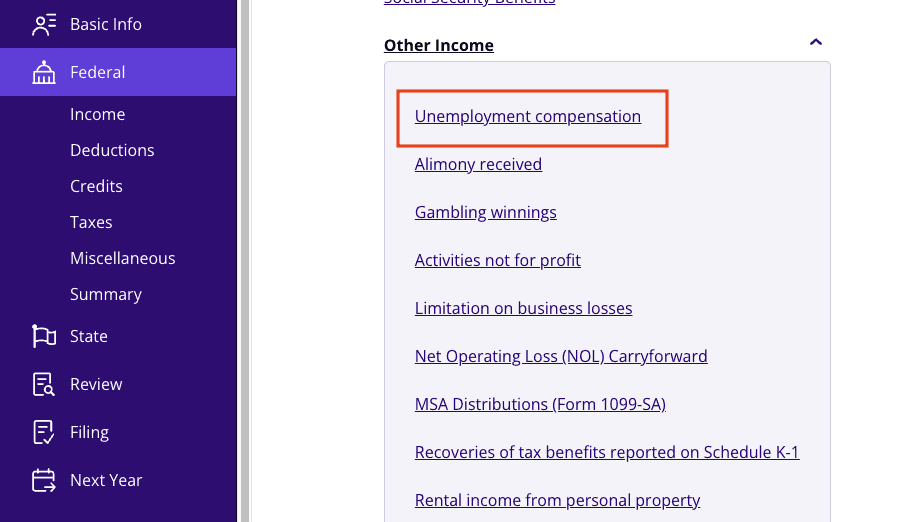
A screenshot of where to report Form 1099-G for unemployment compensation in TaxAct

1099-G: State tax refunds

If your employer withholds state taxes and you itemize deductions, you can deduct your state taxes on your IRS return. If these withholdings exceed your actual state tax, you get a refund.

For example, say your employer withheld $5,000 in state income taxes, but you only owe $3,000 in state taxes. In that case, you would get a $2,000 tax refund from the state. However, let’s say you itemized your deductions and deducted $5,000 in state taxes on your federal income tax return. In this case, the $2,000 refund might be taxable on next year’s federal return, depending on how much you benefited from the deduction. If you didn’t benefit from deducting state income tax or took the standard deduction, you don’t need to report the amount in 1099-G Box 2.

Note: If box 8 on your 1099-G is checked, it means the reported amount is related to your business.

If you’re unsure, TaxAct can help determine whether your state tax refund needs to be reported. To report Form 1099-G in the TaxAct program:

Dashboard

From within your TaxAct return, click Income.

On smaller devices, click the menu at the top left corner of your screen, then make your selection.

Click the Explore More drop-down.

Click Add beside State/Local Tax Refunds. 

Complete the rest of the interview process. 

Classic

From within the return, click Federal.

On smaller devices, click the menu at the top left corner of your screen, then make your selection.

Click State Income Tax Refund as shown in the screenshot below.

Click Add Form 1099-G State Income Tax Refund.

Continue with the interview process to enter your information.
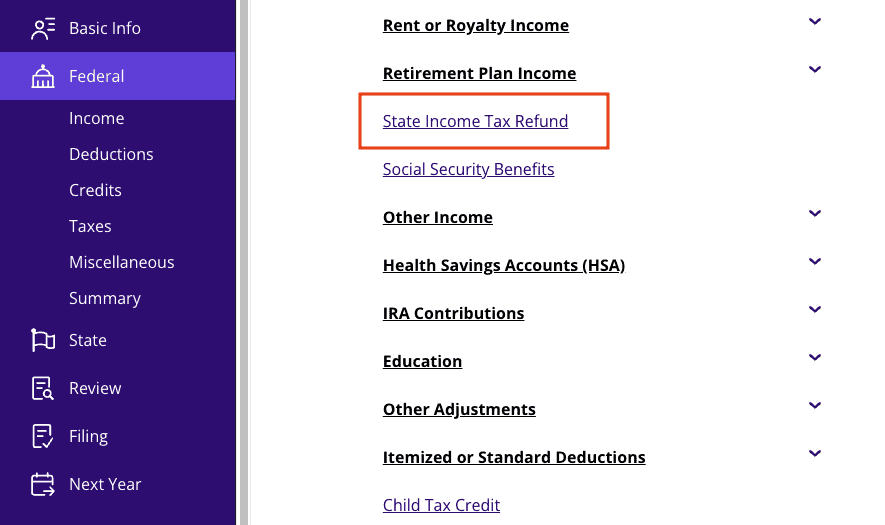
A screenshot of where to report Form 1099-G for state refunds in TaxAct

The bottom line

Form 1099-G is an important taxpayer document, so don’t throw it away! By understanding what it is, why you received it, and how to report it on your tax return, you’ll be well on your way to a smooth and stress-free tax season. And remember, if you ever need help, TaxAct can guide you through every step of the process.

This article is for informational purposes only and not legal or financial advice.

All TaxAct offers, products and services are subject to applicable terms and conditions.



Source link

Tags: 1099GFormGuidetax
ShareTweetShare
Previous Post

The Real Reason Behind Musk’s New $25 Billion Factory

Next Post

Monthly Dividend Stock In Focus: PennantPark Investment Corporation

Related Posts

edit post
If You Never Received a Form 1099, Do You Still Have to Report the Income? – Houston Tax Attorneys

If You Never Received a Form 1099, Do You Still Have to Report the Income? – Houston Tax Attorneys

by TheAdviserMagazine
April 19, 2026
0

The U.S. tax system reports income through Form 1099s and similar information returns. The payer fills out the form, sends...

edit post
A Guide to Taxes on NIL Income

A Guide to Taxes on NIL Income

by TheAdviserMagazine
April 17, 2026
0

Key takeaways NIL income is usually taxable at both the federal and state level, depending on where you earn it....

edit post
The CREATE method: AI prompting for tax & accounting pros

The CREATE method: AI prompting for tax & accounting pros

by TheAdviserMagazine
April 17, 2026
0

Master the CREATE framework; a six-step prompting system that transforms vague AI interactions into precise, professional outputs tailored specifically for...

edit post
Tax firm AI platform vs. point solution: 2026 buyer’s guide

Tax firm AI platform vs. point solution: 2026 buyer’s guide

by TheAdviserMagazine
April 17, 2026
0

Highlights Tax firms face a critical choice between adopting isolated AI point solutions or investing in integrated end-to-end platforms. Point...

edit post
EU Windfall Profits Taxes on Oil and Gas

EU Windfall Profits Taxes on Oil and Gas

by TheAdviserMagazine
April 17, 2026
0

Key Findings Five EU Member States are asking the European Commission to consider taxing windfall profits from high energy prices...

edit post
Building an AS 2310 compliant audit confirmation workflow

Building an AS 2310 compliant audit confirmation workflow

by TheAdviserMagazine
April 16, 2026
0

Highlights PCAOB AS 2310 is reshaping audit confirmation workflows, demanding stronger authentication, documentation, and compliance controls. Structured electronic confirmation processes...

Next Post
edit post
Monthly Dividend Stock In Focus: PennantPark Investment Corporation

Monthly Dividend Stock In Focus: PennantPark Investment Corporation

edit post
What Rothbard Can Teach the Informed Layperson About Prices and Competition

What Rothbard Can Teach the Informed Layperson About Prices and Competition

  • Trending
  • Comments
  • Latest
edit post
Massachusetts loses billions in income after millionaire tax

Massachusetts loses billions in income after millionaire tax

March 24, 2026
edit post
Illinois’ Paid Leave for All Workers Act Takes Effect — Every Employee Now Gets Guaranteed Time Off

Illinois’ Paid Leave for All Workers Act Takes Effect — Every Employee Now Gets Guaranteed Time Off

March 27, 2026
edit post
Virginia Permits ADULT MIGRANT MEN To Attend High School

Virginia Permits ADULT MIGRANT MEN To Attend High School

March 30, 2026
edit post
A 58-year-old left NYC for Miami to save on taxes — then retired early thanks to hidden savings. Here’s the math

A 58-year-old left NYC for Miami to save on taxes — then retired early thanks to hidden savings. Here’s the math

March 30, 2026
edit post
Tax Flight Accelerates In Massachusetts

Tax Flight Accelerates In Massachusetts

April 6, 2026
edit post
Property Tax Relief & Income Tax Relief

Property Tax Relief & Income Tax Relief

April 1, 2026
edit post
Innospec (IOSP) Q4 2024 Earnings Transcript

Innospec (IOSP) Q4 2024 Earnings Transcript

0
edit post
30 Rentals in 5 Years with Small, Affordable Multifamily Properties

30 Rentals in 5 Years with Small, Affordable Multifamily Properties

0
edit post
Rajesh Palviya sees Nifty rally extending this week on strong bullish momentum

Rajesh Palviya sees Nifty rally extending this week on strong bullish momentum

0
edit post
Here’s How Today’s Workers Offset the Rise of AI and Heavy Screen Time

Here’s How Today’s Workers Offset the Rise of AI and Heavy Screen Time

0
edit post
The hidden ROI of AI: What leaders should actually measure

The hidden ROI of AI: What leaders should actually measure

0
edit post
Capital City Bank Group Releases Q1 2026 Financial Results

Capital City Bank Group Releases Q1 2026 Financial Results

0
edit post
Innospec (IOSP) Q4 2024 Earnings Transcript

Innospec (IOSP) Q4 2024 Earnings Transcript

April 20, 2026
edit post
The hidden ROI of AI: What leaders should actually measure

The hidden ROI of AI: What leaders should actually measure

April 20, 2026
edit post
Capital City Bank Group Releases Q1 2026 Financial Results

Capital City Bank Group Releases Q1 2026 Financial Results

April 20, 2026
edit post
Here’s How Today’s Workers Offset the Rise of AI and Heavy Screen Time

Here’s How Today’s Workers Offset the Rise of AI and Heavy Screen Time

April 20, 2026
edit post
30 Rentals in 5 Years with Small, Affordable Multifamily Properties

30 Rentals in 5 Years with Small, Affordable Multifamily Properties

April 20, 2026
edit post
How AI is fueling Bitcoin miners 500% stock gains

How AI is fueling Bitcoin miners 500% stock gains

April 20, 2026
The Adviser Magazine

The first and only national digital and print magazine that connects individuals, families, and businesses to Fee-Only financial advisers, accountants, attorneys and college guidance counselors.

CATEGORIES

  • 401k Plans
  • Business
  • College
  • Cryptocurrency
  • Economy
  • Estate Plans
  • Financial Planning
  • Investing
  • IRS & Taxes
  • Legal
  • Market Analysis
  • Markets
  • Medicare
  • Money
  • Personal Finance
  • Social Security
  • Startups
  • Stock Market
  • Trading

LATEST UPDATES

  • Innospec (IOSP) Q4 2024 Earnings Transcript
  • The hidden ROI of AI: What leaders should actually measure
  • Capital City Bank Group Releases Q1 2026 Financial Results
  • Our Great Privacy Policy
  • Terms of Use, Legal Notices & Disclosures
  • Contact us
  • About Us

© Copyright 2024 All Rights Reserved
See articles for original source and related links to external sites.

Welcome Back!

Login to your account below

Forgotten Password?

Retrieve your password

Please enter your username or email address to reset your password.

Log In
No Result
View All Result
  • Home
  • Financial Planning
    • Financial Planning
    • Personal Finance
  • Market Research
    • Business
    • Investing
    • Money
    • Economy
    • Markets
    • Stocks
    • Trading
  • 401k Plans
  • College
  • IRS & Taxes
  • Estate Plans
  • Social Security
  • Medicare
  • Legal

© Copyright 2024 All Rights Reserved
See articles for original source and related links to external sites.