No Result
View All Result
SUBMIT YOUR ARTICLES
  • Login
Monday, March 30, 2026
TheAdviserMagazine.com
  • Home
  • Financial Planning
    • Financial Planning
    • Personal Finance
  • Market Research
    • Business
    • Investing
    • Money
    • Economy
    • Markets
    • Stocks
    • Trading
  • 401k Plans
  • College
  • IRS & Taxes
  • Estate Plans
  • Social Security
  • Medicare
  • Legal
  • Home
  • Financial Planning
    • Financial Planning
    • Personal Finance
  • Market Research
    • Business
    • Investing
    • Money
    • Economy
    • Markets
    • Stocks
    • Trading
  • 401k Plans
  • College
  • IRS & Taxes
  • Estate Plans
  • Social Security
  • Medicare
  • Legal
No Result
View All Result
TheAdviserMagazine.com
No Result
View All Result
Home IRS & Taxes

Guide to Tax Form 1099-QA

by TheAdviserMagazine
4 weeks ago
in IRS & Taxes
Reading Time: 6 mins read
A A
Guide to Tax Form 1099-QA
Share on FacebookShare on TwitterShare on LInkedIn


Form 1099-QA is tied to your ABLE account, a tax-advantaged savings option for those with disabilities. If you’ve received a distribution from an ABLE account, also called an ABLE program, you’ll get Form 1099-QA. Here’s what this form means and how to report it on your tax return, if necessary.

At a glance:

Form 1099-QA reports distributions from ABLE programs.

Distributions from ABLE accounts are tax-free when used for qualified disability expenses.

You may owe taxes on your earnings if you use the distributions for non-qualified expenses.

What is a 1099-QA form?

The Internal Revenue Service (IRS) uses Form 1099-QA, Distributions from ABLE Accounts, to report distributions you took from an ABLE program during the tax year. You should receive this form if you’re the owner or designated beneficiary of an ABLE account and received distributions during the tax year.

What is an ABLE account?

ABLE stands for Achieving a Better Life Experience. ABLE accounts are tax-advantaged savings accounts established through your state. Funds grow tax-freee, as long as you use them for qualified disability expenses (QDEs). These accounts are designed to help individuals with disabilities save for QDEs without jeopardizing their eligibility for benefits like Social Security.

These accounts come with tax benefits — if you use the money for QDEs, you won’t owe any income tax. But if you use the ABLE funds for non-qualified expenses, a portion of that distribution may be taxable. The IRS uses 1099-QA tax forms to track distributions and ensure that those funds were used for the right expenses.

IRS Form 1099-QA example

Here’s a look at what Form 1099-QA looks like:

On the left, you’ll see:

The payer’s information, address, and taxpayer identification number (TIN)

The recipient’s name (you) and account number

The recipient’s TIN (often your Social Security number)

Let’s break the rest of the form down box by box:

Box 1: Gross distribution – This shows the total amount distributed from your ABLE account during the calendar year. If all your distributions were used for qualified disability expenses, this amount won’t be taxable.

Box 2: Earnings – This is where the earnings portion from your distribution is reported. This part may be taxable income if you used your distributions to pay for non-qualified expenses.

Box 3: Basis – The basis portion represents your original contributions to the account minus any earnings (Box 1 – Box 2 = Box 3).

Box 4: Program-to-program transfer – This box may be checked if your account moved to a new state’s ABLE program or funds were rolled over into another ABLE account. As long as funds were rolled over to another account within 60 days, they do not count as income.

Box 5: ABLE account terminated in the calendar year reported – This box will be checked if you terminated your account during the year.

Box 6: Recipient not designated beneficiary – If this box is checked, it means you are not the designated beneficiary of the ABLE account.

Form 1099-QA instructions

Now that you’ve got the form in hand, what do you do with it? Here’s your step-by-step guide to making sure you’re ready to file your own taxes:

Check for accuracy – First, ensure all the information on your 1099-QA form is correct. Double-check your name, account number, and the amounts reported.

Determine if it’s taxable – Review how you used the distribution. Was it spent on qualified disability expenses like housing, transportation, or health-related needs? If so, you likely won’t owe any income tax on that amount. But if you used the funds for non-qualified expenses, some of the earnings portion may be taxable, and you’ll need to report it on your tax return.

Report taxable income – If you have taxable distributions, make sure to include them on your tax return. This ensures you’re staying compliant with IRS requirements. Not to worry, though — TaxAct® can help you report Form 1099-QA with ease.

Save the form for your records – Even if none of your distribution is taxable, you’ll want to keep a copy of your 1099-QA form for your records. You never know when you’ll need to refer to it or other tax documents for future tax filings.

FAQs about Form 1099-QA


Is all the distribution money on my 1099-QA taxable?

No, only the portion of the distribution used for non-qualified expenses is taxable. You won’t owe income taxes on those funds if you use all your ABLE distributions for QDEs.


What counts as a qualified disability expense?

According to the IRS, QDEs “include any expenses incurred at a time when the designated beneficiary is an eligible individual. The expenses must relate to blindness or disability, including expenses for maintaining or improving health, independence, or quality of life.” Some examples of qualified expenses include housing, education, transportation, health, prevention and wellness, employment training and support, assistive technology, and personal support services.

Check out the ABLE National Resource Center website for more information on this topic.


Will I get another form for ABLE contributions?

Yes, you may also receive Form 5498-QA, which shows ABLE account contribution information. This form doesn’t need to be reported on your tax return, but it’s good to keep for your records.


What happens if I move my ABLE account to another state?

If you transferred your ABLE account to a different state’s program, this will be shown in Box 4 as a program transfer, similar to a rollover. This event won’t be taxable if you contribute the funds to the new ABLE account within 60 days of withdrawal from the original account.


When is the due date to file Form 1099-QA?

The IRS requires filers (the state or agency) to file Form 1099-QA on or before March 1 of the year following your distributions. This means you should expect to receive it around mid-March. If you have reportable distributions, report them on your income tax return by the federal tax deadline on April 15 (or the next business day if that date falls on a weekend or holiday).

How to report Form 1099-QA with TaxAct

TaxAct makes reporting your 1099-QA form a breeze. Here’s how you can easily add the information to your tax return when you e-file with us:

From within your TaxAct return (Online or Desktop), click Federal. (On smaller devices, click in the top left corner of your screen, then click Federal).

Click the Other Income dropdown, then click Distributions from ABLE Accounts (Form 1099-QA) as shown below:
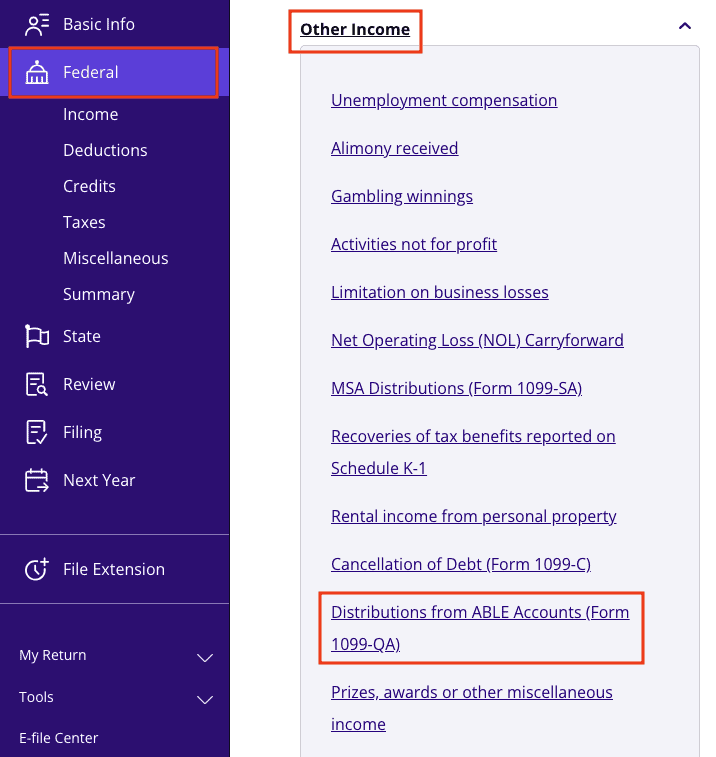
A screenshot of where to report Form 1099-QA in TaxAct

3. Click + Add Form 1099-QA to create a new copy of the form or click Edit to update an existing form. (Desktop program: click Review instead of Edit).

4. Continue with the interview process to enter your information.

The bottom line

If you received Form 1099-QA this year, it’s important to understand how the information affects your taxes. Knowing whether your distributions are taxable or tax-free will help ensure that your tax filing goes off without a hitch. And, as always, TaxAct is here to make the process simple and painless. You’ve got this — and we’re with you every step of the way.

This article is for informational purposes only and not legal or financial advice.

All TaxAct offers, products and services are subject to applicable terms and conditions. 



Source link

Tags: 1099QAFormGuidetax
ShareTweetShare
Previous Post

Tips for Filing an Amended Tax Return | Form 1040x

Next Post

Consultant launches site to track, decipher industry jargon

Related Posts

edit post
President Trump Tariffs & Trade Policy

President Trump Tariffs & Trade Policy

by TheAdviserMagazine
March 30, 2026
0

A year ago on April 2, President Trump charted a new course for US trade, calling it “Liberation Day.” The...

edit post
What Is Schedule C? Definition, Who Files & How It Works

What Is Schedule C? Definition, Who Files & How It Works

by TheAdviserMagazine
March 29, 2026
0

Key Takeaways: Schedule C (Form 1040) is used by sole proprietors, independent contractors, freelancers, and single-member LLC owners to report...

edit post
Selling a Furnished Vacation Home: Allocating Between Real & Personal Property – Houston Tax Attorneys

Selling a Furnished Vacation Home: Allocating Between Real & Personal Property – Houston Tax Attorneys

by TheAdviserMagazine
March 28, 2026
0

A vacation home is nice to have. Many vacation homes are owned for years–if not decades. The capital gains tax...

edit post
Full Service, Mobile & Refund Advance

Full Service, Mobile & Refund Advance

by TheAdviserMagazine
March 27, 2026
0

TaxAct launches Xpert Full Service® along with Spanish-language support, and Refund Advance for the 2026 tax season, expanding its DIY-to-full-service tax...

edit post
Guide to Tax Form 1099-G

Guide to Tax Form 1099-G

by TheAdviserMagazine
March 27, 2026
0

Did you receive Form 1099-G this tax year? Here’s everything you need to know about this important tax form and...

edit post
Common Mistakes to Avoid  |Optima Tax Relief

Common Mistakes to Avoid  |Optima Tax Relief

by TheAdviserMagazine
March 27, 2026
0

Key Takeaways  A tax extension only gives you more time to file, not to pay, making it a common mistake on tax...

Next Post
edit post
Consultant launches site to track, decipher industry jargon

Consultant launches site to track, decipher industry jargon

edit post
State AGs sue after Supreme Court decision

State AGs sue after Supreme Court decision

  • Trending
  • Comments
  • Latest
edit post
Massachusetts loses billions in income after millionaire tax

Massachusetts loses billions in income after millionaire tax

March 24, 2026
edit post
Illinois’ Paid Leave for All Workers Act Takes Effect — Every Employee Now Gets Guaranteed Time Off

Illinois’ Paid Leave for All Workers Act Takes Effect — Every Employee Now Gets Guaranteed Time Off

March 27, 2026
edit post
Publix to Open 5 New Stores by End of April. See Upcoming Locations.

Publix to Open 5 New Stores by End of April. See Upcoming Locations.

March 20, 2026
edit post
Hospitals in This State Routinely Sue Patients Over Unpaid Bills

Hospitals in This State Routinely Sue Patients Over Unpaid Bills

March 27, 2026
edit post
Who Is Legally Next of Kin in North Carolina?

Who Is Legally Next of Kin in North Carolina?

February 28, 2026
edit post
The Growing Movement to End Property Taxes Continues in Kentucky, And What It Means For Investors

The Growing Movement to End Property Taxes Continues in Kentucky, And What It Means For Investors

March 2, 2026
edit post
Selling crypto? What to know before you cash out.

Selling crypto? What to know before you cash out.

0
edit post
SEC Approves Nasdaq Pilot Allowing Investors to Trade Tokenized Stocks

SEC Approves Nasdaq Pilot Allowing Investors to Trade Tokenized Stocks

0
edit post
China suppliers warn of higher U.S. prices due to Hormuz closure

China suppliers warn of higher U.S. prices due to Hormuz closure

0
edit post
US Stocks today: S&P, Nasdaq end lower as investors weigh Middle East conflict outlook

US Stocks today: S&P, Nasdaq end lower as investors weigh Middle East conflict outlook

0
edit post
California Targets AI Hiring Tools With New Rules Requiring Bias Checks and Applicant Disclosure

California Targets AI Hiring Tools With New Rules Requiring Bias Checks and Applicant Disclosure

0
edit post
AI Just Started Improving Itself

AI Just Started Improving Itself

0
edit post
California Targets AI Hiring Tools With New Rules Requiring Bias Checks and Applicant Disclosure

California Targets AI Hiring Tools With New Rules Requiring Bias Checks and Applicant Disclosure

March 30, 2026
edit post
China suppliers warn of higher U.S. prices due to Hormuz closure

China suppliers warn of higher U.S. prices due to Hormuz closure

March 30, 2026
edit post
Most Americans would rather ditch social media than their banking apps, Wells Fargo survey says

Most Americans would rather ditch social media than their banking apps, Wells Fargo survey says

March 30, 2026
edit post
US Stocks today: S&P, Nasdaq end lower as investors weigh Middle East conflict outlook

US Stocks today: S&P, Nasdaq end lower as investors weigh Middle East conflict outlook

March 30, 2026
edit post
Expert Predicts alt=

Expert Predicts $0.80 On Bitcoin’s Potential Retreat To $60,000

March 30, 2026
edit post
AMF Bowling Deals: Up to 69% off and Free Shoe Rentals!

AMF Bowling Deals: Up to 69% off and Free Shoe Rentals!

March 30, 2026
The Adviser Magazine

The first and only national digital and print magazine that connects individuals, families, and businesses to Fee-Only financial advisers, accountants, attorneys and college guidance counselors.

CATEGORIES

  • 401k Plans
  • Business
  • College
  • Cryptocurrency
  • Economy
  • Estate Plans
  • Financial Planning
  • Investing
  • IRS & Taxes
  • Legal
  • Market Analysis
  • Markets
  • Medicare
  • Money
  • Personal Finance
  • Social Security
  • Startups
  • Stock Market
  • Trading

LATEST UPDATES

  • California Targets AI Hiring Tools With New Rules Requiring Bias Checks and Applicant Disclosure
  • China suppliers warn of higher U.S. prices due to Hormuz closure
  • Most Americans would rather ditch social media than their banking apps, Wells Fargo survey says
  • Our Great Privacy Policy
  • Terms of Use, Legal Notices & Disclosures
  • Contact us
  • About Us

© Copyright 2024 All Rights Reserved
See articles for original source and related links to external sites.

Welcome Back!

Login to your account below

Forgotten Password?

Retrieve your password

Please enter your username or email address to reset your password.

Log In
No Result
View All Result
  • Home
  • Financial Planning
    • Financial Planning
    • Personal Finance
  • Market Research
    • Business
    • Investing
    • Money
    • Economy
    • Markets
    • Stocks
    • Trading
  • 401k Plans
  • College
  • IRS & Taxes
  • Estate Plans
  • Social Security
  • Medicare
  • Legal

© Copyright 2024 All Rights Reserved
See articles for original source and related links to external sites.